Firmware for the M-VAVE FM-1 · 0.2-dev
Little stamps. Big ideas.
A Mario Paint-inspired music composer. Pick a character stamp, press a key, and a note lands on the staff. Each of the 31 stamps is its own sound, so a song is a picture you can hear.
Development preview. This firmware runs in emulators and a host simulator, and has not been tested on a physical FM-1 yet.
01 / The idea
A little composer for a little synth
Stamp Composer turns the FM-1 into a music maker in the spirit of Mario Paint. The keys place notes, the knobs shape them, and eight layers let you stack parts. It is built on the open fm1-base platform, and the same C code that runs on the unit also runs in your browser.
- 31sounds, one per stamp
- 8layers to arrange with
- 384notes per song
- 8song slots, plus autosave
- 16steps of undo and redo
- MIDIchannel for every sound
Also on board: a staff with flats and sharps, triplet grids, swing and humanize, bar copy, move and transpose, MIDI clock in and out, and a Twinkle Twinkle demo to start from.
02 / The stamps
31 characters, 31 sounds
Turn PRESETS to choose a stamp. Its name and its instrument are shown under the ribbon, like MARIO / PIANO.
 MarioPiano
 MushroomKick
 YoshiZip
 StarBell
 FlowerTrumpet
 Game BoyPulse
 DogDog
 CatCat
 PigPig
 SwanHorn
 FaceBaby
 PlaneGuitar
 BoatBlock
 CarOrgan
 HeartBass
 PiranhaPiranha
 CoinCoin
 Shy GuyShy Guy
 BooBoo
 LuigiLuigi
 PeachPeach
 FeatherFeather
 Bullet BillBullet
 GoombaGoomba
 Bob-ombBob-omb
 SpinySpiny
 FruitFruit
 1-Up1-Up
 MoonMoon
 EggEgg
 GnomeGnome
03 / Hear the sounds
Pick a sound to preview
Each clip is a short C4 - E4 - G4 arpeggio on one sound. Press a button to hear it; press it again to stop.
- Piano▶
- Kick▶
- Zip▶
- Bell▶
- Trumpet▶
- Pulse▶
- Dog▶
- Cat▶
- Pig▶
- Horn▶
- Baby▶
- Guitar▶
- Block▶
- Organ▶
- Bass▶
- Piranha▶
- Coin▶
- Shy Guy▶
- Boo▶
- Luigi▶
- Peach▶
- Feather▶
- Bullet▶
- Goomba▶
- Bob-omb▶
- Spiny▶
- Fruit▶
- 1-Up▶
- Moon▶
- Egg▶
- Gnome▶
Twinkle Twinkle
The built-in demo, STAR melody over a HEART bass: the first 20 seconds.
Rendered by the host simulator from the firmware's own engine and sound pack, not recorded from hardware. On a real unit the output stage and the speaker will colour it. The clips are normalised for the web.
04 / The pages
Every page, from the firmware's own screen
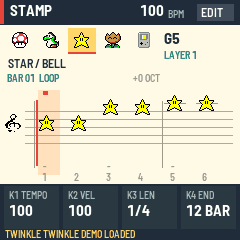
EDIT steps through the pages, GLO opens the song book, HOME comes back to the staff. K1 to K4 follow the four tiles at the bottom of the screen, left to right.
StaffWrite notes: keys place them, SELECT moves the cursor, K1 to K4 set tempo, velocity, length and song end. 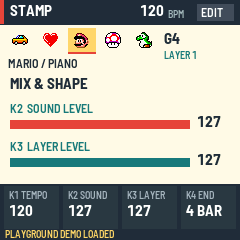
MixBeats per bar, and the level of the selected sound and layer. 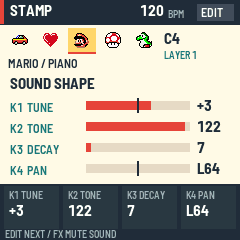
SoundTune, tone, decay and pan for each sound. 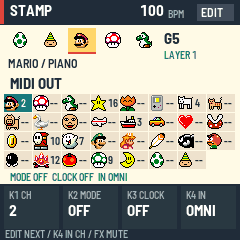
MIDIAll 31 sounds with their channels; mode, clock and MIDI in. 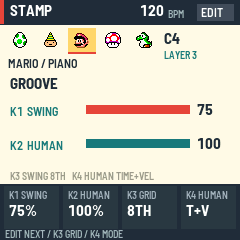
GrooveSwing and human feel, saved with the song. 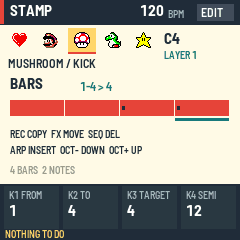
BarsCopy, move, delete, insert and transpose runs of bars. 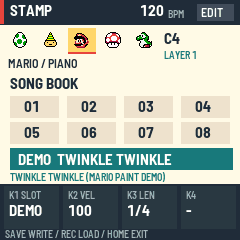
Song bookEight slots and the Twinkle Twinkle demo. 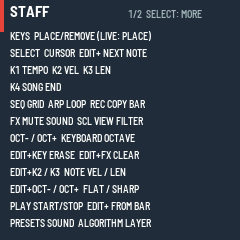
HelpHold HOME for this page's controls. 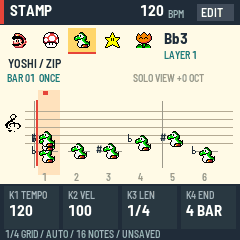
Flats and sharpsBlack keys spelled as you like, drawn on the right line. 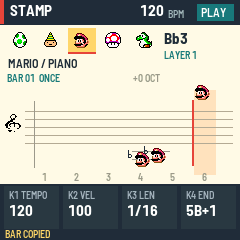
PlayingYour stamp hops along the staff in time.
These are screenshots of the host simulator, which draws the same 240 x 240 screen the firmware does. See the manual for every control on every page.
05 / Your first song
Your first song in 2 minutes
- Turn PRESETS to pick a character. Press a few keys: each one plays and places a note at the cursor. Press a note again to remove it.
- Turn SELECT to move the cursor one step along, and place another note. Press several keys together for a chord.
- Press SEQ to change the step size, then add quicker notes.
- Press PLAY to hear it. Press it again to stop. Not happy? ENV undoes, LFO redoes.
- Turn ALGORITHM to pick another layer, pick another stamp with PRESETS, and add a second part.
- Turn KNOB1 for the tempo and press ARP to loop. Press SAVE to keep it in a slot. It is also saved on its own after a few quiet seconds.
Want a clean page? Press GLO, turn KNOB1 to a slot that says EMPTY and press REC twice. No FM-1 at hand? Try it in your browser, or open the quick preview, which also imports and exports songs as .scf files.
06 / Install
Ready for your FM-1
Install
- Keep M-VAVE's stock firmware file somewhere safe, so you can always go back.
- Use Chrome or Edge on a computer, a data USB cable, and leave the FM-1 powered from USB.
- Open the installer, allow MIDI access, and pick your FM-1.
- Leave "also write m-bootloader" unticked. That replaces the boot loader, and this project has not tested it.
- Press install and do not unplug until the page says it is done.
Back up, and go back
- Backup saves all eight song slots to one file and restores them all together.
- The installer's Back to the stock firmware writes M-VAVE's firmware over the same cable.
- If a unit will not start, it falls into safe mode, and a rescue tool can write stock firmware back. The manual's recovery section and the install notes explain each step.
Not tested on a physical FM-1 yet. Read the install notes before you flash.
07 / Developed in the open
What has been tested, and what has not
Tested
- The core engine and importer, with unit tests (
tests/run_tests.sh). - The whole app on a host simulator driven by scripts: every page, saving, autosave, MIDI, undo, bars, groove.
- The real firmware package, booted and played in the fm1-emu emulator in your browser.
- The same C source compiled to WebAssembly for the quick preview.
Not tested
- Anything on a physical FM-1: real boot, flash, audio output, input feel, MIDI with real gear.
The details are in the validation report.
Downloads
Development build from commit 16e058f, made by this site's workflow. It is not attested: it has no signed build provenance and no release checksums. Releases are attested.
| File | Details |
|---|---|
| stamp-0.2-dev.fwsc | Firmware package, 611,496 bytes. SHA-256 09c2e77f13217f9f53279415252e0452bf94555ec9bb20b577c690019cf54dd4 |
| SHA256SUMS | Checksums of every release file. |
| Source ZIP | The code, the tools and the pinned platform. |
| Validation | What was checked and how. |
08 / Questions
Good to know
Where do the sounds and the pictures come from?
The stamps and the sound pack come from Nintendo's Mario Paint, by way of the Super Mario Paint project. They are not covered by this project's MIT licence, and this is an unaffiliated fan project. They live in an asset pack you can swap: build with STAMP_BANK=placeholder for original tones, or point STAMP_WAV_DIR at your own WAV files.
Will it break my FM-1? How do I go back?
Installing replaces M-VAVE's firmware, so keep the stock file first. The installer can write it back over the same cable, M-VAVE's own updater works too, and if a start fails twice the unit offers a safe mode. The firmware has not been tested on a physical FM-1 yet, so please read the recovery notes before you begin.
Does it do MIDI?
Yes. Every sound can send on its own channel (or all of them can), with velocity, length and tune. There is MIDI clock out, and clock in that makes the FM-1 follow another machine. Notes coming in over USB or the MIDI jack act like keys. The MIDI page has all of it.
Can I bring songs from Super Mario Paint?
Yes, in two steps. The project's importer (tools/import_smp.py) turns a Super Mario Paint song into a .scf file, and the quick preview opens it with Import a .scf song, where you can listen, edit and export it.
Do the keys have to play the stamp I picked?
Yes: the stamp is the sound. Different stamps on different layers make a band. In FREE PLAY (OCT− and OCT+ together) the keys only play and never write, which is handy for jamming over a song.